Un color por asignaturaOne colour per subject
Elige entre 10 colores; cada tarjeta del reloj lleva su barra lateral para reconocerla de un vistazo. Pick from 10 colours; every card on the watch carries its side bar so you recognise it instantly.
Zepp OS 3.x · Amazfit · round & square
NextClass Now muestra la clase que tienes ahora, la siguiente y el día completo sin sacar el teléfono. Editas el horario en el móvil y viaja al reloj por Bluetooth. NextClass Now shows the class you are in right now, the next one and the whole day without taking your phone out. Edit the schedule on your phone and it travels to the watch over Bluetooth.
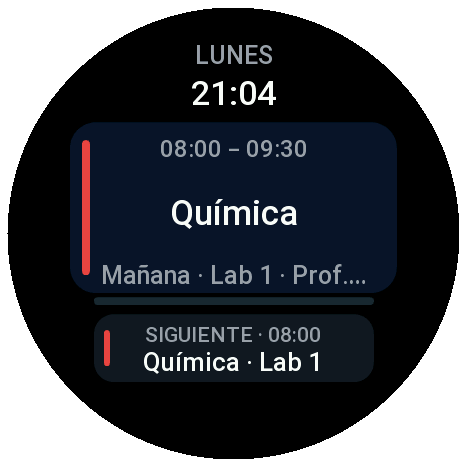
Desliza a izquierda o derecha para saltar entre Ahora, Día y Semana. Sin salir de la app: el gesto hace bucle. Swipe left or right to jump between Now, Day and Week. No accidental exits: the gesture loops.
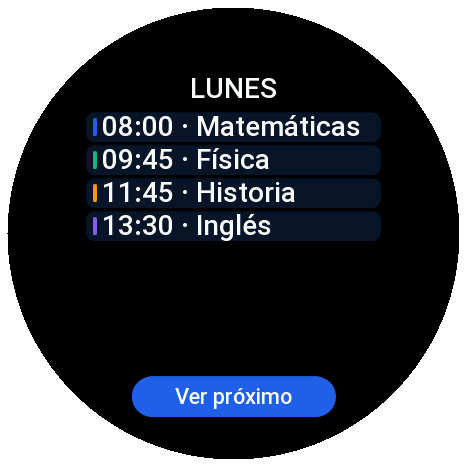
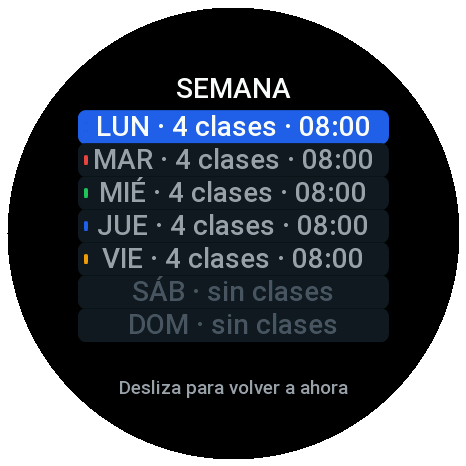
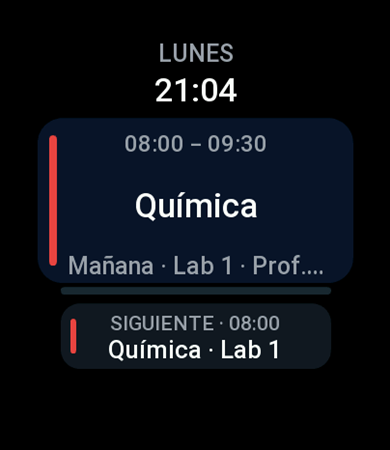
La app incluye dos accesos directos al horario: el widget de la esfera y la tarjeta rápida (Shortcut Card) de la lista de tarjetas. Los dos se pintan con el horario que ya está guardado en el reloj —no hace falta el móvil—, siguen el idioma del reloj y abren la app de un toque. The app ships two shortcuts to your timetable: the widget on the watch face and the shortcut card in the card list. Both are drawn from the timetable already stored on the watch —no phone needed—, follow the watch language and open the app with a single tap.
| Widget de la esferaWatch-face widget | Tarjeta rápidaShortcut card | |
|---|---|---|
| MóduloModule | secondary-widget |
app-widget |
| Zona de dibujoDrawing area | Toda la pantallaThe whole screen | Sólo la tarjeta (más estrecha que la pantalla)Only the card (narrower than the screen) |
| AltoHeight | Pantalla completaFull screen | 240 unidades, declaradas con setAppWidgetSize240 units, declared with setAppWidgetSize |
| Qué enseñaWhat it shows | El nombre de la app, la clase en curso o la siguiente con su tramo y su aula, la barra de progreso y la que viene después. App name, the class you are in or the next one with its time range and room, the progress bar and what comes after. | Lo mismo en formato compacto: rótulo, asignatura, tramo · aula, la barra y la línea de «siguiente». The same in a compact form: label, subject, time · room, the bar and the “next” line. |
| Dónde apareceWhere it lives | En la lista de widgets de la esferaIn the watch-face widget list | En la lista de tarjetas rápidasIn the shortcut card list |
| Para abrir la appTo open the app | Un toque, en cualquier línea o panel One tap, on any line or panel | |
Maquetas del diseño: están dibujadas con CSS a partir de la geometría real de cada módulo (no son capturas). Ninguna de las dos lleva temporizador propio: se repintan al volver a mirar la pantalla, con el horario que el móvil acaba de dejar en el reloj. Y las dos funcionan igual en relojes redondos y cuadrados. Design mock-ups: drawn with CSS from the real geometry of each module (they are not screenshots). Neither keeps a timer of its own: they repaint when you look at the screen again, with the timetable your phone has just saved on the watch. Both work the same on round and square watches.
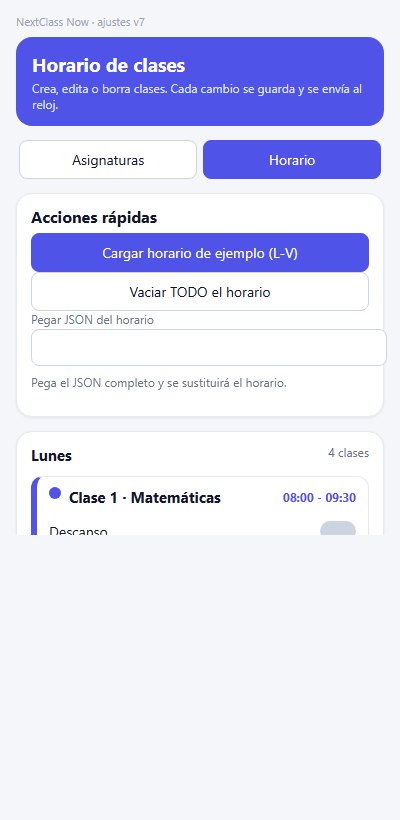
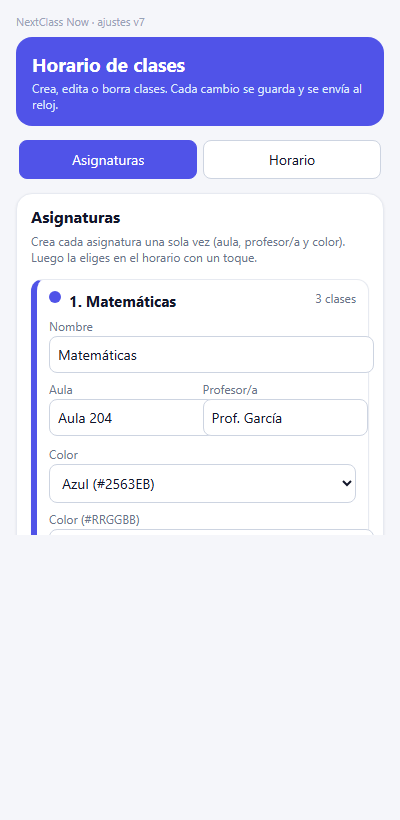
Dos pestañas: el catálogo de asignaturas (nombre, aula, profesor y color) y el horario de la semana. La materia se elige de un toque —nada de escribirla cada vez— y ningún borrado se ejecuta sin preguntar antes. Two tabs: your subjects (name, room, teacher and colour) and the timetable. Subjects are picked with a tap —no retyping— and nothing is deleted without asking first.
Elige entre 10 colores; cada tarjeta del reloj lleva su barra lateral para reconocerla de un vistazo. Pick from 10 colours; every card on the watch carries its side bar so you recognise it instantly.
Creas las asignaturas una vez (nombre, aula, color) y luego sólo las tocas al montar el horario: cada clase coge su color sola. Create subjects once (name, room, colour) and then just tap them while building the timetable: classes take their colour on their own.
Marca huecos de descanso entre clases: salen en el listado con su propio color y sin aula. Mark gap slots as breaks: they show up in the list with their own colour and no room.
Ocupa toda la pantalla: se desliza desde la esfera y enseña la clase en curso o la siguiente con su barra de progreso, sin abrir la app. Full screen: swipe from the watch face and see the class you are in or the next one with its progress bar, without opening the app.
La versión compacta (240 de alto) para la lista de tarjetas: mismos datos y cualquier línea abre la app de un toque. The compact version (240 tall) for the card list: same data and any line opens the app with one tap.
Ajustes en el teléfono con dos pestañas (Asignaturas y Horario). Cada cambio avisa antes de borrar. Phone settings with two tabs (Subjects and Timetable). Every delete asks for confirmation first.
Español, inglés, alemán, francés, italiano y portugués, tanto en el reloj como en los ajustes. Spanish, English, German, French, Italian and Portuguese, both on the watch and in settings.
La geometría se adapta a cada pantalla: nada de texto cortado ni esquinas fuera del marco. Layout adapts to each screen: no clipped text and nothing outside the frame.
El horario vive en el reloj (`schedule.json`) y en tu teléfono. Sin cuentas, sin servidores. The schedule lives on the watch (`schedule.json`) and on your phone. No accounts, no servers.
Abre los ajustes de la app en tu teléfono, crea las asignaturas y coloca cada clase en su día. Open the app settings on your phone, create the subjects and place each class on its day.
Cada cambio se envía al reloj por Bluetooth, incluso si la app está cerrada. Every change is pushed to the watch over Bluetooth, even if the app is closed.
El reloj guarda el horario y calcula la clase en curso con su propia hora, así que lo tienes también en el widget de la esfera y en la tarjeta rápida. The watch stores the schedule and works out the current class using its own clock, so you also get it on the watch-face widget and on the shortcut card.
Se empaqueta una variante por familia de pantalla dentro del mismo paquete: cubre todo el catálogo Zepp OS 3.x. One build per screen family ships inside the same package: it covers the whole Zepp OS 3.x catalog.
| FormaShape | PerfilProfile | ResolucionesResolutions | EjemplosExamples |
|---|---|---|---|
| Round | st: r · dw: 480 |
360×360, 416×416, 454×454, 466×466, 480×480 | GTR 4, Balance, T-Rex, Cheetah… |
| Square | st: s · dw: 390 |
320×380, 336×384, 390×450, 466×466 | GTS 4, GTS 4 Mini… |
| Band | st: b · dw: 194 |
192×349, 194×368 | Band 7… |
La app usa el idioma del reloj automáticamente; los ajustes, el del teléfono. The app follows the watch language; settings follow your phone.
Abre la Zepp App en el teléfono, entra en la tienda de Mini Programas y busca NextClass Now. Open the Zepp App, go to the Mini Program store and search for NextClass Now.
Instálalo en el reloj y ábrelo una vez para que pida el horario. Install it on the watch and open it once so it requests the schedule.
Añade el widget de la esfera o la tarjeta rápida desde el propio reloj y edita tus clases en los ajustes del móvil. Add the watch-face widget or the shortcut card from the watch itself and edit your classes in the phone settings.