Eight actions
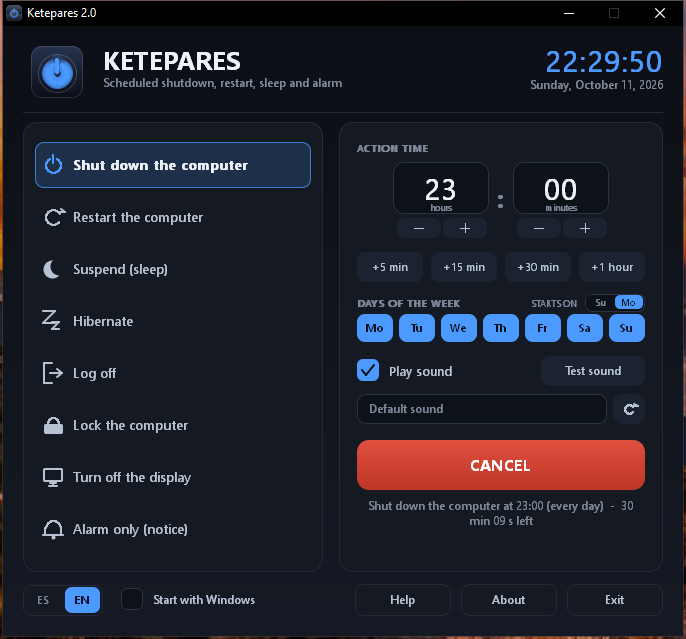
Shut down the computer, restart, suspend, hibernate, log off, lock the computer, turn off the display only, or an alarm that leaves the system alone.
Written in 2004 · rewritten in 2026
Ketepares schedules shutdown, restart, sleep, hibernation, log off or a plain alarm notice. Pick the time and the days, press ACTIVATE, and at the appointed time the action runs — with a 15 second countdown so you can cancel it if you change your mind.
Windows 95, 98, Me, 2000, XP, Vista, 7, 8, 10 and 11 · Linux · macOS 10.15 or later · no installer: download a zip and open it.
Features
Ketepares does its job and stays out of the way: it is ready in seconds, takes up very little, and works the same on Windows, Linux and macOS.
Shut down the computer, restart, suspend, hibernate, log off, lock the computer, turn off the display only, or an alarm that leaves the system alone.
Tick Monday, Wednesday and Friday, or every day. The row starts with the day your system uses, and you can change it with STARTS ON.
Set hours and minutes with − / +, or use the +5 min, +15 min, +30 min and +1 hour shortcuts.
Pick any audio file and it is remembered: wav, mp3, wma, m4a, aiff, midi… If the file goes missing, it falls back to the default sound on its own.
It detects your system language at start-up; if it is not Spanish, it uses English. The ES | EN switch is in the footer and your choice is remembered.
When armed, it leaves an icon in the system tray with its menu: open, activate or cancel, help, about and exit.
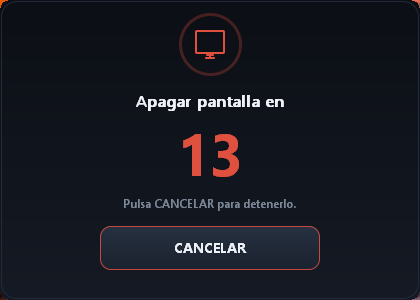
Fifteen seconds before running, a notice appears with the CANCEL button. If you say nothing, the action goes ahead.
One checkbox and that's it: it opens quietly when you turn the computer on, without getting in the way while the system starts.
If it was armed when it closed, opening it again re-arms it by itself with the same time, days and sound.
Under 300 KB: it opens instantly, does not sit in the background eating resources, and runs fine even on modest machines.
The same program, the same design and the same options on all three systems: each one has its own download (the Windows zip, the Linux packages and the Mac app).
A zip under 300 KB (on Linux, the AppImage): unzip it into any folder and open the program. It leaves nothing behind on the system and there is nothing to uninstall.
How it works
This is what the Help button itself explains: there is nothing else to learn.
Shut down, restart, suspend, hibernate, log off, lock, turn off the display, or alarm only.
Move the hours and minutes up or down, tick the days of the week and choose whether you want sound.
The program's own default sound, or any audio file you like — which is remembered for next time.
The Ketepares icon stays next to the clock and the window shows how long is left until the action.
At the appointed time, and after a 15 second countdown notice, Ketepares does what you asked it to.
Screenshots
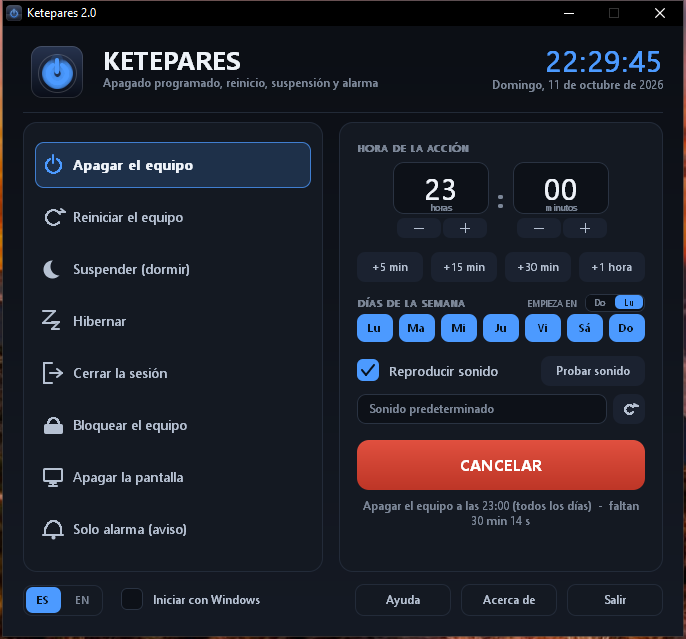
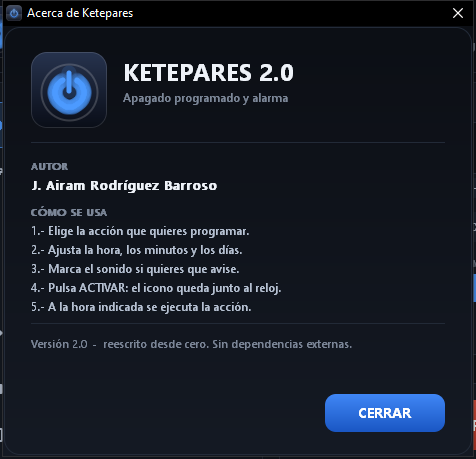
Real screenshots of the program running. The program is bilingual, so a few of them show the Spanish interface. Click any picture to see it bigger.
Versions
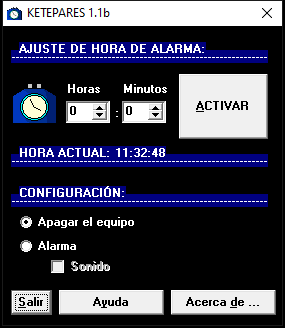
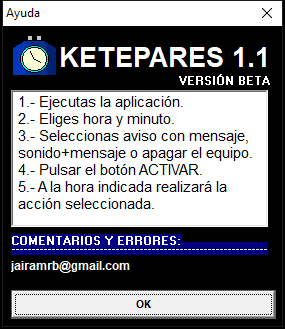
2.0.1 is the current version: it installs on Windows, Linux and macOS, with the same options on all three; it fixes the default sound, which did not play on any system in 2.0.0. And below it is the 2004 program, just as it was released, with its screenshots from back then.


Downloads
The program is the same on all three; what changes is the box. Below is what you need for your system: nothing reaches 2 MB and there is nothing to install to try it.
On Linux there is a .deb package for Ubuntu and
Debian, an AppImage that works on any distribution with nothing
to install, and the usual .tar.gz: all three are signed
with GPG.
The program for Windows: unzip it wherever you like and open ketepares.exe. Nothing to install.
Download Ketepares 2.0.1 (.zip)
Signed by the author. Inside the zip there is a SHA256SUMS.txt
with the fingerprint of every file; the one for the zip itself is
95a793423fc4bda7db707100a42d3e939a81958d98afced1bb55ab26c072866f
The same version, with an installer: it creates the Start menu shortcut, uninstalls from Installed apps and keeps the program in Program Files. For Windows 7 or later.
Download the installer (.zip)
Signed by the author, like the program. Inside is
Ketepares-2.0.1-instalador.exe; its SHA-256 is
127e2fb03ab9e1100c0e0728df1824af9aec9df2fff3f2b7ac5a4b8f6c19e401
The original 2004 Windows program, with its readme from back then, just as it was released.
Download Ketepares 1.1b (.zip)Windows 98, Me, 2000, XP, Vista, 7, 8, 10 and 11 · 32 and 64 bits
ketepares_2.0.1_amd64.deb for Ubuntu, Debian and derivatives. Install it with a double click or from the terminal; it shows up in the applications menu.
Download the .deb
sudo apt install ./ketepares_2.0.1_amd64.deb. If apt
warns at the end that it could not read the file as user
_apt (that is apt, not the package), copy the
.deb to /tmp first and try again.
ketepares-2.0.1-x86_64.AppImage: a single file that runs on any distribution with nothing to install. Give it permission to run and open it.
Download the AppImage
chmod +x ketepares-2.0.1-x86_64.AppImage and open it from
the file manager or from the terminal.
ketepares-2.0.1-linux-x86_64.tar.gz, with the windowed program and the console version (handy if you would rather keep it on a USB stick).
Download the .tar.gz
Signed with GPG: the fingerprints are in SHA256SUMS,
signed in turn (SHA256SUMS.asc), and the public key is
ketepares-clave-publica.asc.
Ubuntu, Debian, Fedora, Arch, openSUSE… with any desktop
.tar.gz or the AppImage and
unzip it wherever you like.chmod +x ketepares../ketepares).sudo apt install ./ketepares_2.0.1_amd64.deb
(it shows up in the applications menu).Ketepares.app for the Mac (Apple Silicon and Intel), with its readme. Install it by dragging it into the Applications folder.
Download for macOS (.zip)
Signed by the author. Inside the zip there is a SHA256SUMS.txt
with the fingerprint of every file; the one for the zip itself is
6f344899b5c259a711f2c8cb7cf18fc1e26944d1d5b5e437bf3bcfc33fd3bb45
It puts the app in Applications and keeps it up to date with
brew upgrade.
brew tap jairamrb/ketepares \
https://gitlab.com/jairamrb/homebrew-ketepares
brew install --cask ketepares
The recipe is served by the project itself from GitLab, with no third-party repositories.
macOS 10.15 or later · Intel and Apple Silicon
Or with Homebrew, which puts it in Applications and keeps it up to date with brew upgrade: it is in the downloads above.
The system may warn you the first time. That is normal: the program is signed by its author (so you can check that the file is the one that was published and that nobody has changed it), but not by a certification authority — which is what Microsoft looks at to drop the warning. On Windows, SmartScreen says “Windows protected your PC” → press More info → Run anyway. On macOS, Gatekeeper says it cannot check the developer → System Settings → Privacy & Security → Open Anyway.
In the press
These sites have published the program, mentioned it in their articles or listed it in their software catalogues.
Articles, tutorials and recommendations that talk about the program.
| Site name | URL |
|---|---|
 Programas Gratuitos (blogspot)Article Programas Gratuitos (blogspot)Article |
programas-gratuitos.blogspot.com — Ketepares 1.0 |
 ADSLZoneArticle ADSLZoneArticle |
adslzone.net — scheduling the PC to turn on |
 Computer HoyArticle Computer HoyArticle |
computerhoy.20minutos.es — ways to shut down Windows 11 |
 SoftZoneArticle SoftZoneArticle |
softzone.es — programs to schedule shutdown |
 Trucos WindowsTutorial Trucos WindowsTutorial |
trucoswindows.com — turning the computer on and off automatically |
The Programas Gratuitos blog published its entry about the program on 17 November 2006.
Download portals where the program has its own page.
| Site name | URL |
|---|---|
 FileHippo (Spanish)Download FileHippo (Spanish)Download |
filehippo.com/es/download_ketepares |
| FileHippo (English)Download |
filehippo.com/download_ketepares |
 SoftonicDownload SoftonicDownload |
ketepares.softonic.com |
 UptodownDownload UptodownDownload |
ketepares.uptodown.com — Ketepares for Windows |
 La Web del ProgramadorDownload La Web del ProgramadorDownload |
lawebdelprogramador.com — Ketepares |
The FileHippo and La Web del Programador pages include information about Ketepares.
These are not download pages: they list it in catalogues or talk about it in forums.
| Site name | URL |
|---|---|
| Uptodown (catalogue)Catalogue |
uptodown.com — automation for Windows |
 DeNunCianDo (forum)Forum DeNunCianDo (forum)Forum |
denunciando.com — thread about Ketepares |
 ForoCoches (forum)Forum ForoCoches (forum)Forum |
forocoches.com — thread about Ketepares |
Frequently asked questions
No. Before running any action a notice appears with a 15 second countdown and a CANCEL button. There is also the “alarm only” action, which just warns you and leaves the system alone. A shutdown or a restart only happens if you let the countdown finish.
On Windows (98, Me, 2000, XP, Vista, 7, 8, 10 and 11), on Linux and on macOS 10.15 or later (Intel and Apple Silicon). The 2004 versions ran from Windows 95 onwards.
There is nothing to install. On Windows you download the zip, unzip it into the folder you want (or a USB stick) and open ketepares.exe; on Linux there is a .deb package, an AppImage and a .tar.gz; and on the Mac, an application you drag into Applications (or install with Homebrew: brew install --cask ketepares, after adding its tap).
Under 300 KB. It opens instantly, does not sit in the background eating resources, and runs fine even on modest machines.
It is the trumpet from the 2004 version, kept out of affection. If you would rather have something else, pick your audio file and it will be remembered; if it ever goes missing or the system cannot play it, Ketepares falls back to the default sound on its own.
Whatever your computer can play: wav, mp3, wma, m4a, aac, aiff, midi… If one of them does not sound, your system is missing the codec for it.
No. If something is scheduled, the window hides and Ketepares stays in the icon next to the clock, with a message to tell you. And if it was armed, opening the program again re-arms it by itself with the same time, days and sound.
Because the program is signed by its author, but not by a certification authority: Windows (SmartScreen) and macOS (Gatekeeper) warn the first time about any program that does not carry that seal, even a harmless one. On Windows press “More info → Run anyway” and on macOS open it with right click → “Open”.
Yes, and on the few 32-bit machines still around too. Memory use is minimal and it leaves no background processes beyond the program itself.